

Fleet managers deal with a constant stream of unknowns. A driver runs a stop sign, a vehicle sits idle for two hours, or a minor collision goes unreported until the insurance claim arrives. These blind spots are expensive and preventable. Vehicle telematics systems collect and transmit near real-time data from GPS locations and OBD-II diagnostics to a secure cloud platform, giving fleet managers the visibility needed to address safety, maintenance, compliance, and operational efficiency. This guide walks through setup, deployment, optimization, and the operational habits that turn raw data into measurable results.
Table of Contents
- What you need to get started with vehicle monitoring
- Step-by-step guide to deploying your vehicle monitoring system
- Troubleshooting and optimizing data flow after go-live
- Closing the loop: Ensuring operational value
- Navigating edge cases and rare events
- Why most fleet monitoring rollouts fail and how to build lasting value
- Next steps: Finding the right fleet monitoring solution
- Frequently asked questions
Key Takeaways
| Point | Details |
|---|---|
| Start with fleet goals | Define your safety, efficiency, and compliance targets before choosing hardware or software. |
| Integrate and filter data | Successful systems require filtering raw alerts and integrating analytics for actionable oversight. |
| Keep dashboards actionable | Prioritize exceptions and automate escalation so managers address critical issues quickly. |
| Workflow accountability matters | Establish routines to review dashboards and ensure every alert triggers follow-up actions. |
| Prepare for rare incidents | Monitor for edge cases and sensor gaps since these uncommon events can impact fleet safety most. |
What you need to get started with vehicle monitoring
With the challenge established, let's outline what's required before you begin implementation.
Getting a vehicle monitoring system running starts with understanding the hardware and software ecosystem. Many fleets jump straight to purchasing devices without mapping their data needs first. That approach leads to mismatched tools and wasted budget.
Hardware essentials
The three core hardware categories every fleet should evaluate are:
- GPS trackers: Standalone units that provide location, route history, and geofencing. Best for fleets focused primarily on location oversight and utilization tracking.
- OBD-II telematics devices: Plug directly into the vehicle's diagnostics port to capture engine data, fault codes, fuel consumption, and driver behavior scores. Telematics devices transmit near real-time data from OBD-II ports to a cloud platform for fleet oversight, safety, maintenance, compliance, and acquisition planning.
- Dash cameras: Front-facing, dual-facing, or multi-camera systems that provide video context for every safety event. Video evidence is critical when insurance claims, disputes, or driver coaching situations arise.
Software requirements
Hardware is only as useful as the platform managing it. Your software stack needs:
- A secure cloud platform with role-based access for fleet managers, safety teams, and dispatchers
- Integration capability with your existing fleet management system (FMS), ERP, or dispatch software
- Dashboard tools that surface alerts, events, and KPIs in a usable format
| Component | Options | Key considerations |
|---|---|---|
| GPS tracker | Hardwired, OBD-II plug-in, asset tracker | Battery life, tamper resistance, polling frequency |
| Telematics device | OBD-II, CAN bus, proprietary | Vehicle compatibility, data depth |
| Dash camera | Front-only, dual-facing, multi-camera | Resolution, night vision, cloud storage |
| Cloud platform | Vendor-hosted, open API, integrated FMS | Data retention, API access, alert logic |
| Integration | ERP, dispatch, maintenance software | Real-time sync, export formats |
Reviewing video telematics options during the planning phase helps you avoid investing in hardware that doesn't align with your platform strategy. Compatibility between devices and your software should be confirmed before purchasing.
For fleets managing efficient fleet operations, the setup stage is also the right time to establish a device compatibility checklist, confirm cellular coverage for all primary routes, and assign a dashboard administrator.
Pro Tip: Before purchasing hardware, list the specific KPIs your fleet needs to track. Common ones include idling time, harsh braking events, speeding incidents, and vehicle utilization rate. This list drives your hardware and software requirements rather than the other way around.
The video telematics guide covers how to match system capabilities to specific fleet goals, including safety scoring, incident review, and insurance support.
Step-by-step guide to deploying your vehicle monitoring system
Once you gather your prerequisites, here's how to execute the deployment smoothly.
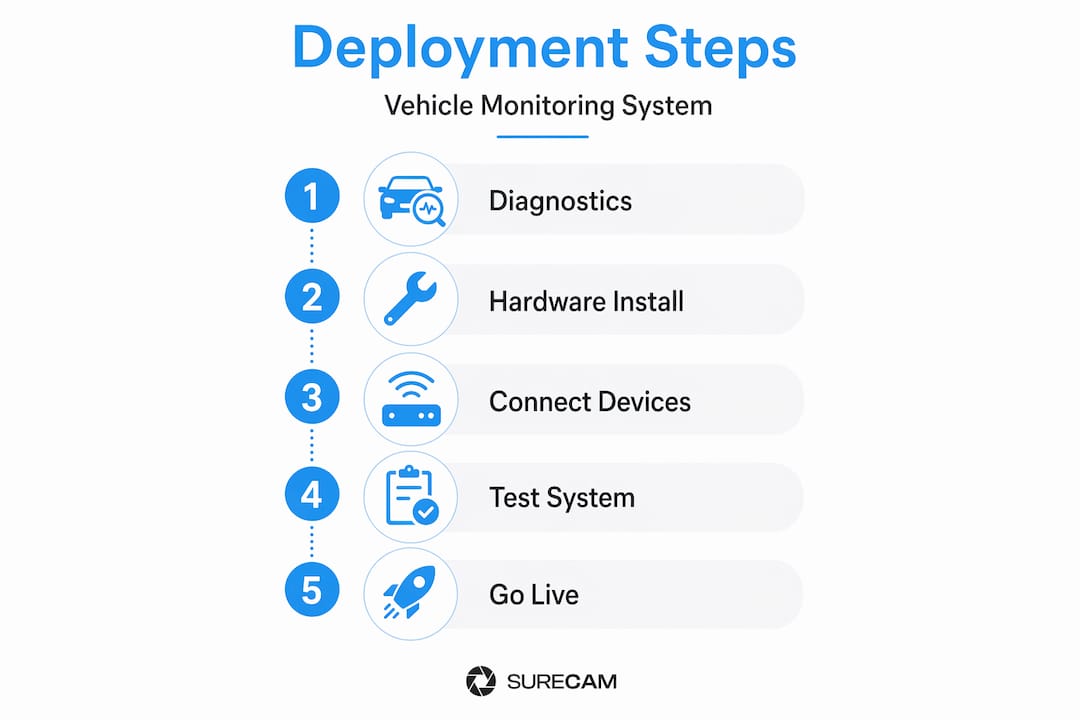
Deployment is where most fleet monitoring projects hit problems. Large-scale rollouts face real friction in cellular connectivity dead zones, integration with existing ERP and dispatch systems, and data volume handling after go-live. A structured process reduces those risks.
Deployment steps
- Pre-install diagnostics: Audit each vehicle for OBD-II compatibility and assess cellular coverage on primary routes. Flag any vehicles requiring hardwired installations due to port inaccessibility.
- Hardware installation: Mount dash cameras using manufacturer specifications. Install telematics devices into OBD-II ports or hardwire where required. Label each device with the corresponding vehicle ID.
- Software provisioning: Register each device in the cloud platform. Assign vehicles to drivers, routes, and groups. Set initial alert thresholds for speed, idling, and impact events.
- Integration with dispatch and ERP systems: Connect the telematics platform to your existing FMS, dispatch software, or ERP. Confirm data fields map correctly between systems. Test automated data transfers with a small vehicle group first.
- Pilot testing: Run 5 to 10 vehicles for two weeks before full rollout. Evaluate data accuracy, alert frequency, integration stability, and driver feedback. Adjust thresholds based on pilot results.
- Full fleet deployment: Roll out to remaining vehicles in stages, prioritizing high-utilization or high-risk vehicles first.
| Step | Tools required | Estimated time |
|---|---|---|
| Pre-install diagnostics | Vehicle list, coverage map, OBD compatibility checker | 1 to 2 days |
| Hardware installation | Mount kits, wiring tools, device units | 30 to 90 minutes per vehicle |
| Software provisioning | Cloud platform, device IDs, driver/vehicle data | 1 to 3 hours (initial batch) |
| ERP/dispatch integration | API credentials, IT support, data mapping | 1 to 5 days depending on complexity |
| Pilot testing | Monitoring dashboard, alert log, test routes | 2 weeks |
| Full fleet rollout | Staged schedule, technician resources | 1 to 4 weeks |
Integrating fleet video data into your broader safety and maintenance strategy is easier when integration points are mapped before installation begins rather than after.

Dash cameras combined with telematics deliver the most complete picture during incidents because video and sensor data are time-synced. This synchronization is critical during post-incident review.
Pro Tip: Test connectivity and data flow in pilot vehicles on your most problematic routes before committing to full deployment. Cellular dead zones discovered during a pilot are far easier to address than after 200 devices are live.
Safety and insurance improvements from video telematics are well documented, but those results depend on a clean deployment. Gaps in data during deployment are hard to recover from and can affect claims review later.
Troubleshooting and optimizing data flow after go-live
Even after installation, smooth operations mean navigating noisy data and optimizing alert logic.
Data starts flowing immediately after deployment. The volume can be overwhelming. Without active management, dashboards become cluttered and fleet managers stop checking them. This is one of the most common reasons monitoring programs fail to deliver ROI.
Common post-install issues
- GPS drift: Devices report incorrect location due to signal bounce, particularly in urban canyons or near large structures. Apply minimum movement thresholds to filter false motion alerts.
- Alert fatigue: High alert volumes cause managers to ignore notifications. Unreviewed alerts mean real events go unaddressed.
- Duplicate events: Poor integration logic generates multiple alerts for a single event. Deduplication rules in the platform settings resolve this.
- Integration errors: Data fields fail to sync between telematics and ERP/dispatch systems after updates. Schedule quarterly integration health checks.
- Sensor failures: Individual device malfunctions generate incomplete or erratic data streams. Monitor for anomalous gaps in vehicle reporting frequency.
Warning: Alert fatigue is the silent failure mode of fleet monitoring. When dashboards are not reviewed consistently, the system is live but operationally blind. Fleet data pipelines must filter and suppress unimportant fluctuations such as GPS drift and prioritize exceptions by severity and business context to keep dashboards actionable.
Optimization strategies
Filtering and suppression rules are the first fix. Set GPS drift bounce suppression by requiring a minimum speed threshold before logging movement. Tag alerts by severity so critical events (hard braking, collision detection) are visually distinct from informational events (idling threshold reached).
Automate exception escalation. A hard braking event at highway speed should route immediately to a safety manager. A repeated speeding alert for the same driver should trigger a coaching workflow automatically rather than waiting for a weekly review.
Video telematics best practices include establishing a tiered alert structure within the first 30 days after go-live. Reviewing the vehicle tracking guide provides additional context for connecting alert logic to specific safety outcomes.
Closing the loop: Ensuring operational value
With technical issues addressed, it's critical to turn raw data into operational value in daily workflows.
Technology alone does not improve fleet safety. The data must connect to decisions and actions. Telematics systems can go live but fail operationally if alerts aren't triaged, dashboards aren't reviewed, or data isn't linked to follow-up processes.
Turning monitoring data into action
- Triage incoming alerts daily: Assign a designated reviewer to check priority alerts each morning. Unreviewed alerts from the previous day should be escalated or cleared by end of business.
- Conduct weekly dashboard reviews: Pull driver safety scores, fleet utilization, and top recurring events. Identify patterns rather than responding to individual incidents in isolation.
- Assign accountability: Every alert category needs an owner. Speeding alerts go to dispatch. Maintenance fault codes go to the shop manager. Incident footage reviews go to the safety team.
- Update workflows based on findings: If data shows a specific route generating repeated harsh braking events, investigate the route. If a driver has three consecutive coaching flags, escalate to a formal review.
- Measure KPIs monthly: Track the metrics you established during setup. Compare period over period to evaluate whether the system is producing measurable safety improvements.
Sustaining ongoing value
- Schedule quarterly platform reviews to confirm alert thresholds still reflect current fleet operations
- Re-evaluate integration health after any ERP or dispatch system update
- Retire KPIs that are no longer relevant and add new ones as fleet composition changes
- Share performance results with drivers to build accountability and engagement
Fleet camera systems for business owners deliver the strongest results when safety data connects to effective driver communication programs. Isolated data exports with no follow-through are a common trap. Treat monitoring as an operational discipline, not a reporting function.
Maintenance compliance programs offer a parallel example of how structured follow-through transforms raw data into operational habit across vehicle-related programs.
Navigating edge cases and rare events
Finally, fleets must stay vigilant for edge cases, which are uncommon incidents that can have outsized impacts.
High-frequency events like speeding and idling are easy to monitor. Rare but serious events are harder to catch and carry far greater consequences when missed.
Edge cases are rare but safety-relevant scenarios and sensor or coverage failures are important long-tail issues in fleet data. Fleet data can help discover these rare events, but the volume and scale of data required to surface them reliably can be challenging to manage.
Categories of edge cases in fleet operations
- Environmental events: Extreme weather conditions triggering false collision alerts or obscuring camera footage. Floods, ice, and dense fog fall into this category.
- Behavioral anomalies: A driver who rarely triggers alerts but shows a sudden pattern shift. Single-event outliers that don't fit normal distribution deserve individual review.
- Sensor failures: A camera or telematics device that stops reporting creates a coverage gap. If a vehicle goes dark, the absence of data is itself a warning signal.
- Object-level incidents: Near-misses with pedestrians, cyclists, or stationary objects that don't generate a full collision event but are captured on video if reviewed.
- Coverage gaps: Routes through rural or low-signal areas where telematics data is intermittent. These zones need to be mapped and monitored for data completeness.
Managing rare events
Monitor for anomalies in reporting frequency. A vehicle that reports every 30 seconds suddenly going silent for two hours signals either a device failure or a coverage gap. Both deserve immediate review.
Log unusual events in a separate category within your platform. This archive of rare events builds institutional knowledge over time and helps calibrate alert logic for scenarios that standard thresholds miss.
Dash camera solutions are particularly valuable for edge case discovery because video provides context that sensor data alone cannot. A hard braking score does not tell you whether a vehicle narrowly avoided a pedestrian or braked for a traffic light. Video does.
Prepare workflows before rare events occur. Assign an escalation path for any event that cannot be categorized by standard alert logic. Unclassified events left in a queue without follow-up are missed safety opportunities.
Why most fleet monitoring rollouts fail and how to build lasting value
The technology is rarely the problem. Fleets fail at monitoring programs because they treat deployment as the finish line rather than the starting point.
The most common failure pattern is this: hardware is installed, a pilot is declared successful, and the system goes live. Dashboards are reviewed for the first month. Then a manager leaves, workflows aren't reassigned, and within 90 days the platform is live but ignored. The data keeps arriving. Nobody acts on it.
Real success requires assigning ownership of every alert category before go-live, not after. It requires scheduling dashboard reviews as standing meetings, not optional check-ins. It requires connecting safety scores to driver conversations using effective fleet communication processes that drivers trust and managers consistently follow through on.
The fleets that get measurable results share one trait. They treat monitoring data as an operational input, the same way they treat dispatch schedules or maintenance logs. It is reviewed, acted on, and adjusted regularly.
Pro Tip: Assign a named owner to each alert type in your platform settings. Add that owner's name to the alert notification so accountability is built into the workflow by design, not by assumption.
Don't just pilot and walk away. Plan for organizational integration from day one. Build the review cadence into existing operational meetings. Evolve KPIs annually as fleet composition and safety goals change. That discipline is what separates fleets that reduce claims from those that simply have more data.
Next steps: Finding the right fleet monitoring solution
With a clear roadmap, now connect to reliable solutions fitted to your operational needs.
Understanding the deployment process is the foundation. The next step is selecting a platform and camera system that matches your fleet's specific safety, compliance, and efficiency goals.
SureCam offers fleet camera systems for business owners that combine GPS tracking, AI-based safety scoring, and cloud video storage into a single integrated platform. For fleets that need real-time visibility, live streaming dash cams provide on-demand access to vehicle footage from any location. Fleet managers looking to formalize their approach can also review telematics best practices aligned to safety, insurance, and operational KPIs. The full product range covers front-facing, dual-facing, waterproof, and multi-camera systems for diverse commercial vehicle needs.
Frequently asked questions
What data does a vehicle monitoring system typically collect?
Commonly, systems gather GPS location, speed, sensor diagnostics, and driver behavior data. Telematics devices transmit near real-time data from OBD-II ports to a secure cloud platform, covering fleet oversight, safety, maintenance, compliance, and acquisition planning.
How do I avoid alert fatigue when using monitoring dashboards?
Suppress non-meaningful alerts and apply severity tags to prioritize actionable exceptions. Fleet data pipelines must filter and suppress unimportant fluctuations like GPS drift and rank exceptions by business context to keep dashboards useful.
What are common pitfalls in large-scale monitoring system deployments?
Challenges include connectivity dead zones, integration with existing systems, and overwhelming data volumes. Large-scale fleet tracking deployments face friction in cellular coverage, ERP and dispatch integration, and post-go-live data filtering.
How can vehicle monitoring improve fleet safety and reduce claims?
Monitoring provides actionable data and video evidence for fast incident review and proactive driver coaching. Telematics systems transmit near real-time data that supports safety decisions, maintenance compliance, and insurance claim documentation.
What are edge cases and why do they matter in fleet operations?
Edge cases are rare safety-critical incidents that fall outside normal alert logic. Edge cases and sensor failures are important long-tail issues; preparing workflows and video review processes helps prevent rare events from becoming major losses.