

A driver gets rear-ended at a busy intersection. The other party claims your driver ran a red light. Without clear footage and a documented policy governing how that footage is accessed and used, you're left scrambling — and potentially exposed. Dash cams offer real power to protect your fleet, but privacy vs. safety tension is real, and without a thoughtful policy in place, even well-intentioned programs can generate driver backlash, legal complications, or data misuse. This guide walks you through every stage of building a dash cam policy that actually works.
Table of Contents
- Understanding why a dash cam policy is essential
- Preparing for policy rollout: Tools, requirements, and stakeholder engagement
- How to implement your dash cam policy: Step-by-step approach
- Troubleshooting common pitfalls and ensuring ongoing compliance
- Measuring success and adjusting your dash cam policy
- The real key: Transparency and trust outweigh technology
- Take your next step: Smarter dash cam solutions for your fleet
- Frequently asked questions
Key Takeaways
| Point | Details |
|---|---|
| Balance safety and privacy | Effective dash cam policies maximize safety and accountability without compromising driver trust and legal compliance. |
| Engage stakeholders early | Communicate clearly with drivers, obtain consents, and invite feedback before rolling out any monitoring technology. |
| Coach, don’t just monitor | Use dash cam footage primarily as a driver coaching and safety improvement tool, not for surveillance. |
| Audit data practices regularly | Limit who can access footage, retain only what’s necessary, and review your policy to adapt to new risks. |
Understanding why a dash cam policy is essential
Dash cams do more than record video. When deployed correctly, they create a feedback loop that improves driver behavior, speeds up insurance claims, and protects your company from fraudulent accusations. But the benefits only materialize when your program is grounded in a clear, documented policy that everyone understands from day one.
The dashcam benefits for commercial fleets are well established. Cameras can exonerate innocent drivers in seconds when footage clearly contradicts a false claim. They also support faster claims resolution, which reduces legal costs and keeps insurance premiums from spiraling. Beyond incident response, dash cams generate coaching opportunities that help drivers self-correct risky habits before those habits become accidents.
That said, the same technology introduces real risk if mismanaged. Rapid ROI data from fleet adoption studies confirms that safety advocates and finance teams both see strong returns, but privacy experts consistently warn that poorly scoped programs invite legal exposure. The risks are not hypothetical. They include employee grievances, regulatory scrutiny, and data breach liability.
Here is what a solid policy needs to address from the start:
- Safety and accountability: Define how footage supports coaching and incident review, not just punishment.
- Privacy protections: Clarify what is recorded, who can access it, and how long it is stored.
- Legal compliance: Account for state-specific consent laws and federal data protection standards.
- Driver communication: Explain the program's purpose clearly before cameras go live.
"The organizations that see the strongest results treat dash cam programs as safety tools first and surveillance tools never." This mindset shapes everything from camera placement to how footage is discussed in driver reviews.
When you frame the policy around safety and coaching from the beginning, you reduce the risk of driver pushback. Research suggests that fewer than 10% of drivers strongly resist dash cam programs when rollout is handled transparently and with genuine respect for their concerns.
Preparing for policy rollout: Tools, requirements, and stakeholder engagement
Once you understand the stakes, preparation becomes your most important phase. Rushing into deployment without the right legal, technical, and organizational groundwork is one of the most common mistakes fleet managers make.
Legal preparation is non-negotiable. Some states require all-party consent before recording audio inside a vehicle. If your fleet operates across state lines, you need to obtain consents that satisfy the strictest applicable standard. Work with your legal team or outside counsel to identify which jurisdictions apply to your routes and what documentation you need from drivers before cameras activate.
Technical preparation involves selecting the right hardware for your specific fleet needs. Not every fleet needs the same camera configuration. Consider the following options:

| Camera type | Best use case | Key feature |
|---|---|---|
| Front-facing only | Highway and long-haul fleets | Road incident documentation |
| Dual-facing (road + cab) | Urban delivery, passenger transport | Driver behavior and road view |
| Multicamera systems | Large vehicles, construction equipment | Full surround coverage |
| Waterproof/exterior cams | Utility and field service vehicles | Exterior asset protection |
When selecting camera types, prioritize systems that support safety coaching over constant monitoring. AI-powered alerts that flag harsh braking, speeding, or distracted driving give you actionable data without requiring someone to watch hours of footage. That distinction matters to drivers and to your legal team.
Organizational preparation means appointing specific data managers who control access to footage. Not everyone in your organization should be able to pull video at will. Define roles clearly: who can view footage, under what circumstances, and with what level of approval.
Pro Tip: Run a small internal survey before rollout to understand what specific concerns your drivers have. Addressing those concerns directly in your policy language builds far more trust than a generic memo.
Getting driver buy-in is not a soft goal. It is a practical one. Drivers who understand and accept the program are less likely to tamper with cameras or behave differently only when they think they are being watched. Genuine buy-in produces genuine behavioral improvement.
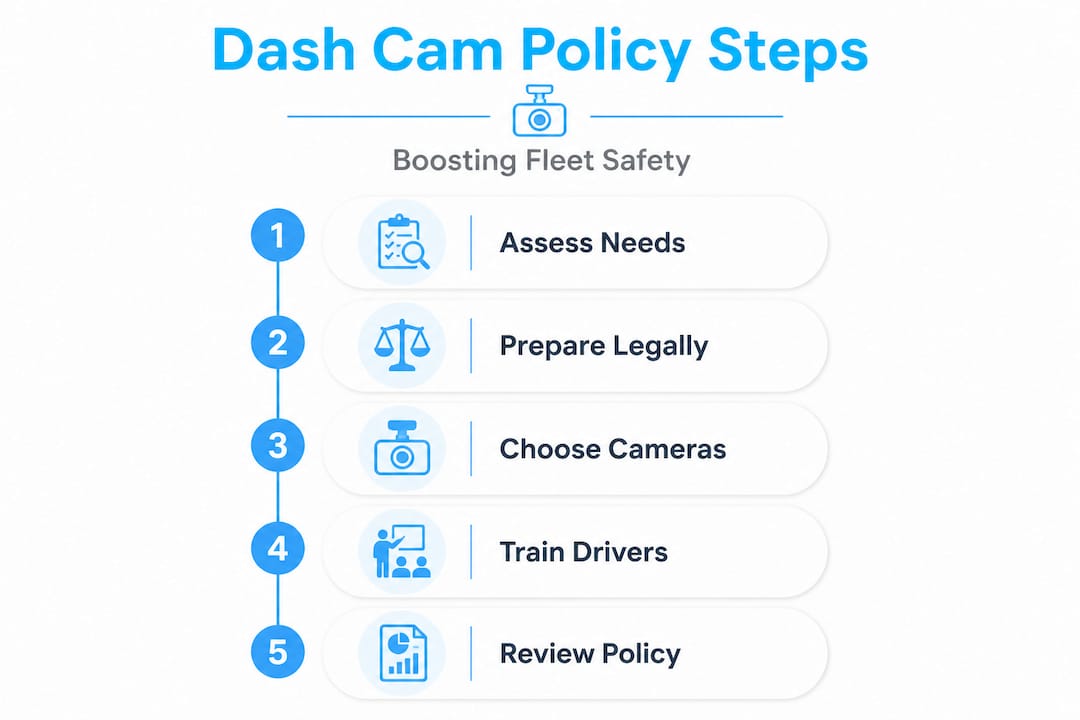
How to implement your dash cam policy: Step-by-step approach
With your groundwork in place, you are ready to build and launch the policy itself. A structured sequence prevents gaps and keeps your rollout legally sound.
- Draft the policy document. Define scope (which vehicles, which routes), data usage (coaching, incident review, legal defense), consent requirements, retention periods, and access controls. Be specific. Vague policies create confusion and legal vulnerability.
- Communicate before deployment. Hold team meetings or individual briefings to explain the program. Use plain language. Avoid corporate jargon. Tell drivers exactly what will be recorded, who will see it, and how it will be used.
- Frame it as coaching, not surveillance. Driver dash cam training should emphasize that footage is a tool for improvement, not a gotcha mechanism. Show drivers examples of how footage has helped colleagues in past incidents.
- Run a pilot program. Start with a small group of vehicles, ideally volunteers. Gather feedback on technical issues, driver experience, and any unexpected data capture. Only 6% of fleets report severe driver backlash when a pilot approach is used, compared to much higher resistance rates with full immediate rollout.
- Review with legal and compliance. Before expanding to your full fleet, have your legal team review the policy against current state and federal requirements. This is also the time to confirm your vendor's data security practices.
- Roll out and audit regularly. Full deployment is not the finish line. Schedule quarterly reviews to catch policy drift, address new legal developments, and incorporate driver feedback.
| Approach | Driver acceptance | Legal risk | Implementation speed |
|---|---|---|---|
| Full rollout, no pilot | Lower | Higher | Fast |
| Phased pilot first | Higher | Lower | Moderate |
| Volunteer-led pilot | Highest | Lowest | Slower but sustainable |
Overcoming dashcam challenges in new fleets is much easier when you treat the pilot phase as a learning opportunity rather than a test of driver compliance.
Pro Tip: When you minimize audio recording and driver-facing cameras unless there is a specific, documented justification, you dramatically reduce legal exposure and driver resistance at the same time. Only add those features when the safety or operational case is clear and documented.
Statistic to keep in mind: Fleets that use coaching-first dash cam programs report significantly faster improvements in driver safety scores compared to those using footage primarily for discipline. The data supports the approach, not just the principle.
Troubleshooting common pitfalls and ensuring ongoing compliance
Even well-planned programs run into problems. Knowing the most common pitfalls in advance lets you build safeguards before they become crises.
Unintended data capture is a real and underappreciated risk. Cameras positioned to capture road events can inadvertently record sensitive information, including medical appointments visible through windows, private conversations, or locations that reveal protected personal information. Risks include unintended data capture of medical and other sensitive details, AI bias in behavior detection systems, and vendor data breaches. Each of these can create legal liability if your policy does not address them.
Common pitfalls to watch for:
- Overly broad surveillance without documented justification for each camera type or placement
- Unrestricted footage access that allows managers or HR staff to browse video without a specific incident trigger
- Long retention periods that accumulate sensitive data far beyond any operational need
- Vendor lock-in with providers who have weak data security practices or unclear breach notification policies
- Inconsistent enforcement where some drivers receive coaching and others receive discipline for similar events, creating discrimination risk
"Narrow your data collection to what you genuinely need, and you automatically reduce your exposure on every other risk dimension." This principle applies to camera placement, retention periods, and access controls equally.
Effective dash cam video management depends on role-based access controls. Set up your system so that dispatchers, safety managers, HR, and executives each have access only to the footage relevant to their specific responsibilities. Log every access event so you can audit who viewed what and when.
Pro Tip: Schedule a formal policy review every six months for the first two years of your program. Regulations change, your fleet changes, and your vendor's capabilities change. A policy written in 2024 may have real gaps by 2026 if it has never been updated.
Your fleet onboarding guide should include a section specifically on privacy protections so drivers know from day one that the program has built-in safeguards, not just monitoring tools.
Measuring success and adjusting your dash cam policy
Deployment is not the end of the process. Measuring outcomes tells you whether your policy is delivering on its promises and where adjustments are needed.
Key metrics to track:
- Incident frequency: Are accidents, near-misses, and traffic violations declining over time?
- Claims resolution speed: How quickly are insurance claims being resolved compared to before dash cam deployment?
- Driver safety scores: Are coaching interventions producing measurable improvements in individual driver behavior?
- Footage access logs: Are access patterns consistent with your policy, or are there anomalies that suggest misuse?
- Driver feedback scores: Are drivers reporting that the program feels fair and focused on safety?
| Metric | Measurement method | Review frequency |
|---|---|---|
| Incident rate | Fleet safety reports | Monthly |
| Claims resolution time | Insurance records | Quarterly |
| Driver safety scores | Telematics dashboard | Weekly |
| Footage access compliance | System access logs | Monthly |
| Driver satisfaction | Anonymous surveys | Biannually |
Safety and ROI must be balanced with ongoing privacy considerations and robust audit processes. That balance is not a one-time achievement. It requires active management and a willingness to adjust when the data shows something is not working.
Use video management best practices to structure your review cycles so that footage analysis feeds directly into training content. When drivers see that their coaching sessions are based on real events and focused on improvement, the program gains credibility and trust compounds over time.
The real key: Transparency and trust outweigh technology
Here is something most dash cam implementation guides will not tell you. The technology is the easy part. The hard part is cultural, and no camera system, however advanced, can substitute for genuine trust between fleet managers and drivers.
We have seen fleets invest in top-tier hardware and sophisticated AI analytics, then watch driver morale drop and safety scores stagnate because the program was rolled out as a monitoring tool rather than a safety partnership. Conversely, we have seen fleets with modest camera setups achieve dramatic safety improvements simply because they communicated openly, involved drivers in the process, and used footage exclusively for coaching.
Prioritizing driver welfare is not a soft value. It is a strategic one. Drivers who feel respected and protected by their employer drive more carefully, report near-misses proactively, and stay with the company longer. All of those outcomes reduce costs directly.
The most effective dash cam policies share three characteristics. They are written in plain language that drivers can actually understand. They include explicit protections for driver privacy, not just management access rights. And they position the camera as a tool that works for the driver as much as it works for the company. When a driver knows that footage will protect them in a false claim situation, the camera stops being a threat and becomes an asset they value.
Take your next step: Smarter dash cam solutions for your fleet
Building a policy is only half the equation. You also need camera systems that are designed to support coaching, protect privacy, and deliver the data your safety team actually needs.
SureCam's fleet dash cameras are built specifically for commercial fleets, with AI-powered safety alerts, cloud-based video storage, and role-based access controls that align with best-practice policy frameworks. Whether you need a front-facing setup for highway fleets or dual dash cams for urban delivery vehicles, the platform gives you the flexibility to match your hardware to your policy requirements. Explore the full range of dash cam systems and connect with a fleet safety specialist to find the right configuration for your operation.
Frequently asked questions
Do I need driver consent to record dash cam footage?
Yes, consent is often required, especially in all-party consent states and when recording audio or driver-facing video. All-party consent laws vary by state, so review the requirements for every jurisdiction your fleet operates in.
What's the best way to address driver concerns about privacy?
Prioritize transparency, use footage for coaching rather than constant surveillance, and restrict both access and retention of sensitive data. A coaching-first approach consistently reduces pushback and builds long-term program acceptance.
How long should dash cam footage be kept?
Keep footage only as long as it is needed for active investigations or coaching purposes, then delete it securely. Short retention periods significantly reduce your legal exposure and limit the risk of sensitive data accumulation.
Can dash cam footage be used to defend against insurance claims?
Yes, footage frequently provides the decisive evidence needed to exonerate drivers or resolve disputes quickly. Dash cams support exoneration and deliver measurable ROI for commercial fleets across multiple industries.
What are the biggest risks with dash cam policies?
The primary risks include unintended capture of sensitive personal information, AI bias in behavior detection, and vendor data breaches. Mitigate these risks through careful access controls, short retention windows, and thorough vetting of your technology vendor.